
💻 App Store Intelligence
PDF Reader Pro: Read & Edit
PDF Technologies, Inc. · Productivity
Rating
—
No ratings yet
Price
Free
US storefront
Size
781.8 MB
v5.3.5
Age Rating
9+
33 languages
Categories
Productivity
Business
Daily chart position by storefront
Top Free (Apps)
Tracking since 10 Jul 2026 · lower is better · hover a point for the exact date and rank
Description
PDF Reader Pro is a full-featured PDF reader and editor for Mac, iPad, and iPhone. Read, edit, annotate, convert, compress, sign, redact, compare, and organize PDFs in one workflow.
AI-POWERED PDF
- Summarize, translate, proofread, rewrite, and extract insights from PDFs.
OCR & SEARCHABLE PDF
- Convert scans, images, and batches into editable or searchable PDFs. Enhance and correct images, use area OCR for selected content, and scan documents, receipts, forms, and notes. Search, copy, highlight, and annotate recognized text.
ANNOTATE PDF
- Highlight, underline, strikethrough, freehand, text box, anchored note, shape, and more.
- Create signatures with trackpad, keyboard, or images; add custom, image, and dynamic stamps.
- Add or edit hyperlinks and measure PDF distances, perimeters, and areas.
EDIT PDF
- Add, edit, or remove text; change font size, style, and color; align text boxes.
- Crop, rotate, flip, replace, or export images.
- Add, edit, or remove text/image watermarks, headers/footers, Bates numbers, and backgrounds.
- Compare two PDF versions and highlight changes.
PDF CONVERTER PRO
- Export PDF to Word, PPT, Excel, RTF, Text, HTML, Image, CSV, and more.
- Create PDFs from MS Office, images, scanners, web pages, and cameras; extract images.
SIGN PDF
- eSign: Create, distribute, and track signing status in real time.
- Quick signatures: Add typed, handwritten, or image-based signatures in seconds.
- Secure digital signatures: Verify signer identity and protect document integrity.
ORGANIZE PAGES
- Split and combine files; insert pages from PDFs, images, blank pages, or scanners.
- Extract pages; merge PDFs; rotate, copy, delete, replace, and crop pages.
CREATE & FILL FORMS
- Create fillable forms with buttons, checkboxes, list boxes, and other interactive fields; align objects.
- Fill out static and interactive PDF forms.
VIEW PDF
- Single-page, two-page, full-screen, horizontal/vertical, and auto-scroll modes; dark mode.
- Split view to read and compare two PDFs; slideshow mode to present PDFs.
- Create, edit, and search outlines; bookmark pages.
PRINT & SHARE PDF
- Booklet, poster, and multiple-page printing.
- Share flattened PDFs and upload files to Dropbox, iCloud Drive, and more.
COMPRESS PDF
- Reduce PDF size and customize compression by image resolution or redundant-item removal.
SECURE FILES
- Password-protect documents and control editing, copying, modifying, and printing permissions.
- Redact PDF content to permanently remove sensitive information.
LISTEN (TEXT-TO-SPEECH)
- Read large files aloud with TTS in 50+ languages.
Terms of Service
https://www.pdfreaderpro.com/terms_of_service
Privacy Policy
https://www.pdfreaderpro.com/privacy-policy
Powered by ComPDF:
https://www.compdf.com/
Contact ComPDF:
support@compdf.com
Have feedback? Please contact us directly at support@pdfreaderpro.com
AI-POWERED PDF
- Summarize, translate, proofread, rewrite, and extract insights from PDFs.
OCR & SEARCHABLE PDF
- Convert scans, images, and batches into editable or searchable PDFs. Enhance and correct images, use area OCR for selected content, and scan documents, receipts, forms, and notes. Search, copy, highlight, and annotate recognized text.
ANNOTATE PDF
- Highlight, underline, strikethrough, freehand, text box, anchored note, shape, and more.
- Create signatures with trackpad, keyboard, or images; add custom, image, and dynamic stamps.
- Add or edit hyperlinks and measure PDF distances, perimeters, and areas.
EDIT PDF
- Add, edit, or remove text; change font size, style, and color; align text boxes.
- Crop, rotate, flip, replace, or export images.
- Add, edit, or remove text/image watermarks, headers/footers, Bates numbers, and backgrounds.
- Compare two PDF versions and highlight changes.
PDF CONVERTER PRO
- Export PDF to Word, PPT, Excel, RTF, Text, HTML, Image, CSV, and more.
- Create PDFs from MS Office, images, scanners, web pages, and cameras; extract images.
SIGN PDF
- eSign: Create, distribute, and track signing status in real time.
- Quick signatures: Add typed, handwritten, or image-based signatures in seconds.
- Secure digital signatures: Verify signer identity and protect document integrity.
ORGANIZE PAGES
- Split and combine files; insert pages from PDFs, images, blank pages, or scanners.
- Extract pages; merge PDFs; rotate, copy, delete, replace, and crop pages.
CREATE & FILL FORMS
- Create fillable forms with buttons, checkboxes, list boxes, and other interactive fields; align objects.
- Fill out static and interactive PDF forms.
VIEW PDF
- Single-page, two-page, full-screen, horizontal/vertical, and auto-scroll modes; dark mode.
- Split view to read and compare two PDFs; slideshow mode to present PDFs.
- Create, edit, and search outlines; bookmark pages.
PRINT & SHARE PDF
- Booklet, poster, and multiple-page printing.
- Share flattened PDFs and upload files to Dropbox, iCloud Drive, and more.
COMPRESS PDF
- Reduce PDF size and customize compression by image resolution or redundant-item removal.
SECURE FILES
- Password-protect documents and control editing, copying, modifying, and printing permissions.
- Redact PDF content to permanently remove sensitive information.
LISTEN (TEXT-TO-SPEECH)
- Read large files aloud with TTS in 50+ languages.
Terms of Service
https://www.pdfreaderpro.com/terms_of_service
Privacy Policy
https://www.pdfreaderpro.com/privacy-policy
Powered by ComPDF:
https://www.compdf.com/
Contact ComPDF:
support@compdf.com
Have feedback? Please contact us directly at support@pdfreaderpro.com
Screenshots

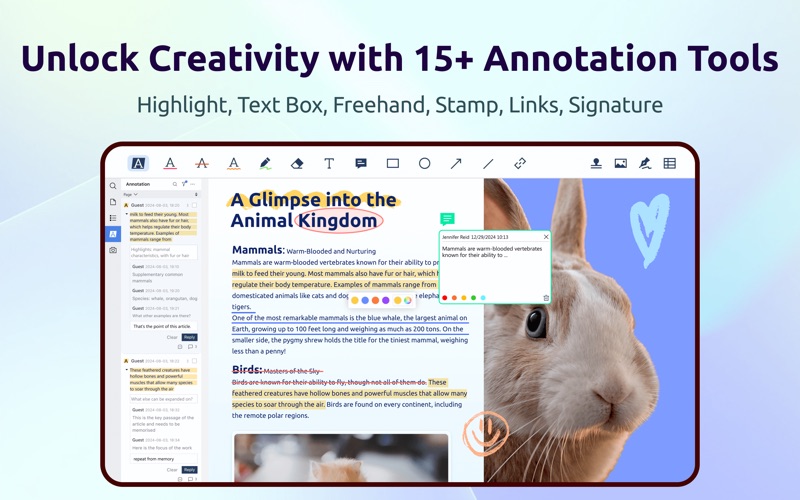


Chart presence — 13 positions tracked
| Storefront | Category | Chart | Rank |
|---|---|---|---|
| Brazil | Apps | Top Free | #44 |
| Spain | Apps | Top Free | #45 |
| Croatia | Apps | Top Free | #48 |
| Taiwan | Apps | Top Free | #51 |
| Israel | Apps | Top Free | #55 |
| Argentina | Apps | Top Free | #59 |
| Indonesia | Apps | Top Free | #70 |
| Thailand | Apps | Top Free | #74 |
| Chile | Apps | Top Free | #76 |
| Portugal | Apps | Top Free | #80 |
| Hong Kong | Apps | Top Free | #85 |
| United Arab Emirates | Apps | Top Free | #90 |
| Czech Republic | Apps | Top Free | #91 |
Details
App Store data shown here is sourced from Apple's public iTunes RSS chart feeds and the iTunes Lookup API, collected by Zing at regular intervals. Figures may differ from Apple's internal App Store Connect analytics.
Explore App Store Intelligence