
Rating
—
No ratings yet
Price
Free
US storefront
Size
11.7 MB
v1.0.1
Age Rating
4+
1 languages
Categories
Education
Productivity
Daily chart position by storefront
Top Free (Apps)
Tracking since 10 Jul 2026 · lower is better · hover a point for the exact date and rank
Description
The complete AI workspace for your Mac.
42 specialist tools, three AI models, and a focused, private interface — all in a native macOS app that feels at home on your Dock.
——————————————
WRITE
- Polished emails, blog posts, and social drafts
- Long-form essays and creative fiction
- Notes summarization with action items
- Resume tailoring and interview prep
CODE
- Paste any code, get a structured review
- Plain-English explanation of unfamiliar code
- Auto-generate unit tests in your framework
- SQL builder, regex tutor, API designer, debug helper
LEARN
- Quiz Master — generate quizzes on anything
- Flashcards with spaced repetition
- Mind Maps for visual thinking
- Study plans tailored to your goals
CREATE
- Recipe Chef — cook with what is in your fridge
- Travel Planner — day-by-day itineraries
- Workout Coach, Habit Tracker, Sleep Helper
- Brainstorm, outline, draft at your pace
WORK
- Meeting notes to action items in one click
- Slides outline and blog post structure
- Research summaries with cited points
- Calendar coordination across timezones
——————————————
PRIVACY-FIRST
Speech recognition and image OCR run locally on your Mac using Apple's frameworks. Your audio and photos never leave your device — only the extracted text is sent to the AI.
Chat history lives on your Mac. No cloud sync. No marketing emails. No tracking beyond opt-in usage analytics, togglable in Settings, takes effect instantly.
——————————————
THREE MODELS, ONE TOOLBAR
Switch between three AI tiers from the top toolbar — pick the one that fits the task:
- Opus — deep reasoning for complex work, 1M-context window
- Sonnet — daily workhorse, balanced for speed and depth
- Haiku — fastest replies for quick questions
Each costs different credits per call. You stay in control.
——————————————
START FREE
50 starter credits when you sign in with Apple — yours to spend. Subscribe to Pro to unlock all 42 specialist tools and 2,000 monthly credits. Cancel anytime.
——————————————
POWER USER
Command-K — Command palette for any action
Command-N — New chat
Command-\ — Toggle sidebar
Command-P — Choose a tool
Slash commands in chat: /quiz, /code, /recipe and more
Drop images, PDFs, audio, or text files directly into the composer. The app extracts the content locally and sends only what is needed.
——————————————
NATIVE MAC
Built with SwiftUI for macOS 13 Ventura and later. Hardened runtime, sandboxed, signed for the Mac App Store. Sign in with Apple. Optimized for Apple Silicon. Light and dark themes that follow your system.
——————————————
WIDGETS AND MENU BAR
Three widgets — Credits, Quick Actions, and Recent Chats. A menu bar shortcut puts new chat, tools, and your recent conversations one click away from anywhere on your Mac.
——————————————
SUBSCRIPTIONS
- Pro Monthly — recurring monthly subscription
- Pro Yearly — recurring annual subscription, best value
Subscriptions auto-renew unless canceled at least 24 hours before the end of the current period. Manage or cancel in System Settings, Apple ID, Subscriptions.
——————————————
SUPPORT
help@karenlee.online
Terms: karenlee.online/legal/terms
Privacy: karenlee.online/legal/privacy
EULA: karenlee.online/legal/eula
42 specialist tools, three AI models, and a focused, private interface — all in a native macOS app that feels at home on your Dock.
——————————————
WRITE
- Polished emails, blog posts, and social drafts
- Long-form essays and creative fiction
- Notes summarization with action items
- Resume tailoring and interview prep
CODE
- Paste any code, get a structured review
- Plain-English explanation of unfamiliar code
- Auto-generate unit tests in your framework
- SQL builder, regex tutor, API designer, debug helper
LEARN
- Quiz Master — generate quizzes on anything
- Flashcards with spaced repetition
- Mind Maps for visual thinking
- Study plans tailored to your goals
CREATE
- Recipe Chef — cook with what is in your fridge
- Travel Planner — day-by-day itineraries
- Workout Coach, Habit Tracker, Sleep Helper
- Brainstorm, outline, draft at your pace
WORK
- Meeting notes to action items in one click
- Slides outline and blog post structure
- Research summaries with cited points
- Calendar coordination across timezones
——————————————
PRIVACY-FIRST
Speech recognition and image OCR run locally on your Mac using Apple's frameworks. Your audio and photos never leave your device — only the extracted text is sent to the AI.
Chat history lives on your Mac. No cloud sync. No marketing emails. No tracking beyond opt-in usage analytics, togglable in Settings, takes effect instantly.
——————————————
THREE MODELS, ONE TOOLBAR
Switch between three AI tiers from the top toolbar — pick the one that fits the task:
- Opus — deep reasoning for complex work, 1M-context window
- Sonnet — daily workhorse, balanced for speed and depth
- Haiku — fastest replies for quick questions
Each costs different credits per call. You stay in control.
——————————————
START FREE
50 starter credits when you sign in with Apple — yours to spend. Subscribe to Pro to unlock all 42 specialist tools and 2,000 monthly credits. Cancel anytime.
——————————————
POWER USER
Command-K — Command palette for any action
Command-N — New chat
Command-\ — Toggle sidebar
Command-P — Choose a tool
Slash commands in chat: /quiz, /code, /recipe and more
Drop images, PDFs, audio, or text files directly into the composer. The app extracts the content locally and sends only what is needed.
——————————————
NATIVE MAC
Built with SwiftUI for macOS 13 Ventura and later. Hardened runtime, sandboxed, signed for the Mac App Store. Sign in with Apple. Optimized for Apple Silicon. Light and dark themes that follow your system.
——————————————
WIDGETS AND MENU BAR
Three widgets — Credits, Quick Actions, and Recent Chats. A menu bar shortcut puts new chat, tools, and your recent conversations one click away from anywhere on your Mac.
——————————————
SUBSCRIPTIONS
- Pro Monthly — recurring monthly subscription
- Pro Yearly — recurring annual subscription, best value
Subscriptions auto-renew unless canceled at least 24 hours before the end of the current period. Manage or cancel in System Settings, Apple ID, Subscriptions.
——————————————
SUPPORT
help@karenlee.online
Terms: karenlee.online/legal/terms
Privacy: karenlee.online/legal/privacy
EULA: karenlee.online/legal/eula
Screenshots

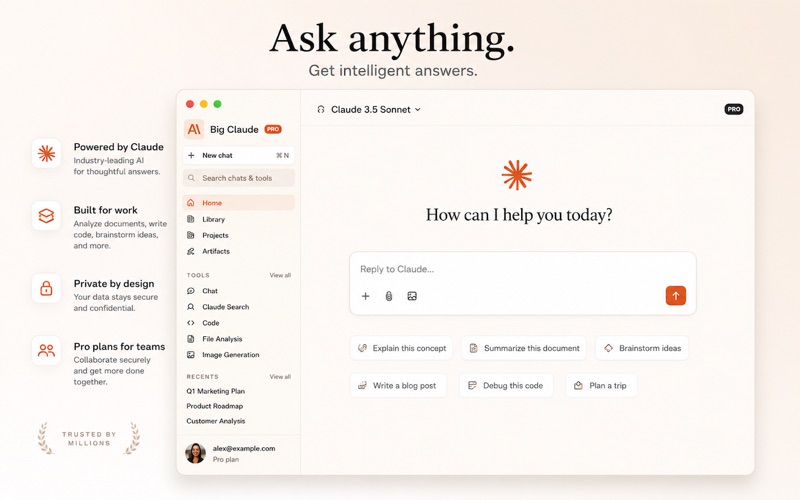


Chart presence — 1 position tracked
| Storefront | Category | Chart | Rank |
|---|---|---|---|
| Israel | Apps | Top Free | #59 |
Details
App Store data shown here is sourced from Apple's public iTunes RSS chart feeds and the iTunes Lookup API, collected by Zing at regular intervals. Figures may differ from Apple's internal App Store Connect analytics.
Explore App Store Intelligence