
💻 App Store Intelligence
CamPhoto
Alvaro Neira · Photo & Video
Rating
—
No ratings yet
Price
Free
US storefront
Size
3.7 MB
v2.14.0
Age Rating
4+
10 languages
Categories
Photo & Video
Daily chart position by storefront
Top Free (Apps)
Tracking since 10 Jul 2026 · lower is better · hover a point for the exact date and rank
Description
CamPhoto is the complete webcam solution for your Mac. Take photos and videos with your webcam or your iPhone — fast, in top quality, and with no subscriptions.
Photos and videos with your webcam or iPhone
- Supports all USB webcams compatible with Mac
- Use your iPhone as a camera thanks to Apple's Continuity Camera
- Choose the resolution, frame rate (FPS), and maximum quality for each camera
- Supports Portrait mode, backgrounds, Center Stage, Studio Light, and Reactions when your camera offers them
- Capture with the big shutter button, the space bar, or the Enter key
- The screen blinks when you take a photo — just like on your iPhone
Realtime Face Effects
Hide your face right in the live feed — great for privacy and for fun:
- Blur: blurs your face
- Pixelate: pixelates your face
- BlackBox: places a black rectangle over your face
- StickerFace: places a random emoji over your face
The effects use Apple AI for face detection, work in real time, and can detect up to 4 faces at once. You can adjust the size of the covered area in the settings. For now, the effects are available for photos.
Floating Webcam Feed
A floating window showing the live video from your webcam or iPhone — perfect for video tutorials, videocasts, video calls, streaming, and reactions. Also great for checking how you look before an important video conference.
- 3 shapes: circular, rectangular, or rectangular with rounded corners
- Resize it to any size and move it anywhere on the screen
- "Stay on Top" keeps the window above all other windows — even over apps in fullscreen mode
- A dedicated menu bar icon to control the app
- Take photos in this mode too
- Right-click the window to open the same context menu right there
Your sound, your choice
Select any audio input your Mac supports. Ideal for musicians, singers, and YouTubers: capture the video with your iPhone camera and the audio with your professional gear. CamPhoto remembers the last audio device you used.
Thoughtful down to the details
- Hands-free timer with a 3, 5, or 10 second countdown, including a countdown sound
- Shutter and timer sounds can be turned on or off in the settings
- Mirror effect (flips the image horizontally)
- Thumbnail of your latest capture — click it to open the folder where it's stored
- Choose any folder to save your photos and videos
- Remembers the resolution and frame rate for each camera
- Fullscreen mode from the menu bar
- Dark and light mode
- Detects when the laptop lid is closed
- Respects the aspect ratio: no cropping, no distortion. What you see is what you get.
- High-quality scaling with the Lanczos transform
- Runs on older devices too — from macOS 11 Big Sur onward
- Made with SwiftUI for macOS
CamPhoto Pro — pay once, keep it forever
In the free version, a watermark appears when using the face effects or the Floating Webcam Feed. Everything else is completely watermark-free. With CamPhoto Pro (one-time purchase, no subscriptions) you remove all watermarks and unlock all current and future features.
Questions or ideas? Write to us at support@camphotoapp.com or visit https://camphotoapp.com
More features are on the way.
Photos and videos with your webcam or iPhone
- Supports all USB webcams compatible with Mac
- Use your iPhone as a camera thanks to Apple's Continuity Camera
- Choose the resolution, frame rate (FPS), and maximum quality for each camera
- Supports Portrait mode, backgrounds, Center Stage, Studio Light, and Reactions when your camera offers them
- Capture with the big shutter button, the space bar, or the Enter key
- The screen blinks when you take a photo — just like on your iPhone
Realtime Face Effects
Hide your face right in the live feed — great for privacy and for fun:
- Blur: blurs your face
- Pixelate: pixelates your face
- BlackBox: places a black rectangle over your face
- StickerFace: places a random emoji over your face
The effects use Apple AI for face detection, work in real time, and can detect up to 4 faces at once. You can adjust the size of the covered area in the settings. For now, the effects are available for photos.
Floating Webcam Feed
A floating window showing the live video from your webcam or iPhone — perfect for video tutorials, videocasts, video calls, streaming, and reactions. Also great for checking how you look before an important video conference.
- 3 shapes: circular, rectangular, or rectangular with rounded corners
- Resize it to any size and move it anywhere on the screen
- "Stay on Top" keeps the window above all other windows — even over apps in fullscreen mode
- A dedicated menu bar icon to control the app
- Take photos in this mode too
- Right-click the window to open the same context menu right there
Your sound, your choice
Select any audio input your Mac supports. Ideal for musicians, singers, and YouTubers: capture the video with your iPhone camera and the audio with your professional gear. CamPhoto remembers the last audio device you used.
Thoughtful down to the details
- Hands-free timer with a 3, 5, or 10 second countdown, including a countdown sound
- Shutter and timer sounds can be turned on or off in the settings
- Mirror effect (flips the image horizontally)
- Thumbnail of your latest capture — click it to open the folder where it's stored
- Choose any folder to save your photos and videos
- Remembers the resolution and frame rate for each camera
- Fullscreen mode from the menu bar
- Dark and light mode
- Detects when the laptop lid is closed
- Respects the aspect ratio: no cropping, no distortion. What you see is what you get.
- High-quality scaling with the Lanczos transform
- Runs on older devices too — from macOS 11 Big Sur onward
- Made with SwiftUI for macOS
CamPhoto Pro — pay once, keep it forever
In the free version, a watermark appears when using the face effects or the Floating Webcam Feed. Everything else is completely watermark-free. With CamPhoto Pro (one-time purchase, no subscriptions) you remove all watermarks and unlock all current and future features.
Questions or ideas? Write to us at support@camphotoapp.com or visit https://camphotoapp.com
More features are on the way.
Screenshots
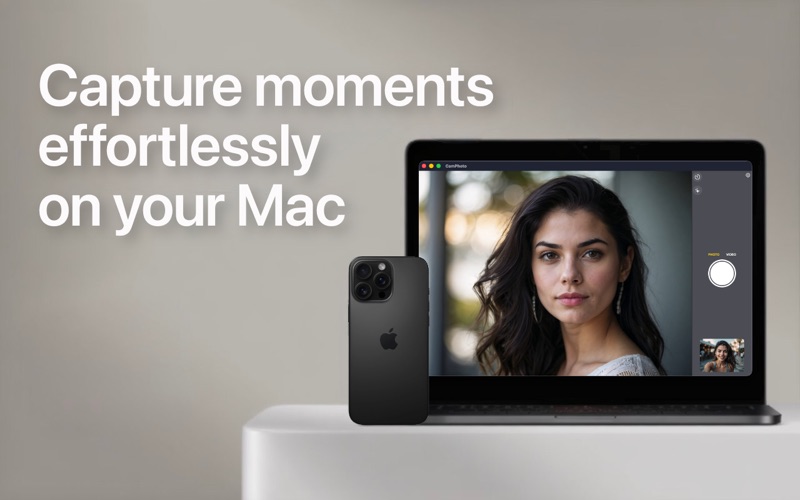


Chart presence — 35 positions tracked
| Storefront | Category | Chart | Rank |
|---|---|---|---|
| Norway | Apps | Top Free | #16 |
| Colombia | Apps | Top Free | #19 |
| Estonia | Apps | Top Free | #27 |
| Kuwait | Apps | Top Free | #31 |
| Spain | Apps | Top Free | #37 |
| Denmark | Apps | Top Free | #39 |
| Sweden | Apps | Top Free | #39 |
| Mexico | Apps | Top Free | #41 |
| India | Apps | Top Free | #43 |
| Chile | Apps | Top Free | #44 |
| Lithuania | Apps | Top Free | #44 |
| Netherlands | Apps | Top Free | #44 |
| South Africa | Apps | Top Free | #45 |
| Egypt | Apps | Top Free | #53 |
| Greece | Apps | Top Free | #53 |
| Vietnam | Apps | Top Free | #53 |
| Nigeria | Apps | Top Free | #54 |
| Argentina | Apps | Top Free | #56 |
| Japan | Apps | Top Free | #57 |
| Kazakhstan | Apps | Top Free | #61 |
| Canada | Apps | Top Free | #62 |
| Finland | Apps | Top Free | #70 |
| United Kingdom | Apps | Top Free | #75 |
| Bahrain | Apps | Top Free | #77 |
| Hungary | Apps | Top Free | #78 |
| Philippines | Apps | Top Free | #80 |
| Indonesia | Apps | Top Free | #82 |
| Romania | Apps | Top Free | #82 |
| Malaysia | Apps | Top Free | #87 |
| Brazil | Apps | Top Free | #88 |
| United Arab Emirates | Apps | Top Free | #90 |
| Slovakia | Apps | Top Free | #90 |
| United States | Apps | Top Free | #93 |
| Belgium | Apps | Top Free | #95 |
| South Korea | Apps | Top Free | #95 |
Ratings by country — 35 storefronts
| Storefront | Rating | Rating Count | Price |
|---|---|---|---|
| Norway | 0.0 ★ | 0 | Free |
| Colombia | 0.0 ★ | 0 | Free |
| Estonia | 0.0 ★ | 0 | Free |
| Kuwait | 0.0 ★ | 0 | Free |
| Spain | 0.0 ★ | 0 | Free |
| Denmark | 0.0 ★ | 0 | Free |
| Sweden | 0.0 ★ | 0 | Free |
| Mexico | 0.0 ★ | 0 | Free |
| India | 0.0 ★ | 0 | Free |
| Chile | 0.0 ★ | 0 | Free |
| Lithuania | 0.0 ★ | 0 | Free |
| Netherlands | 0.0 ★ | 0 | Free |
| South Africa | 0.0 ★ | 0 | Free |
| Egypt | 0.0 ★ | 0 | Free |
| Greece | 0.0 ★ | 0 | Free |
| Vietnam | 0.0 ★ | 0 | Free |
| Nigeria | 0.0 ★ | 0 | Free |
| Argentina | 0.0 ★ | 0 | Free |
| Japan | 0.0 ★ | 0 | Free |
| Kazakhstan | 0.0 ★ | 0 | Free |
| Canada | 0.0 ★ | 0 | Free |
| Finland | 0.0 ★ | 0 | Free |
| United Kingdom | 0.0 ★ | 0 | Free |
| Bahrain | 0.0 ★ | 0 | Free |
| Hungary | 0.0 ★ | 0 | Free |
| Philippines | 0.0 ★ | 0 | Free |
| Indonesia | 0.0 ★ | 0 | Free |
| Romania | 0.0 ★ | 0 | Free |
| Malaysia | 0.0 ★ | 0 | Free |
| Brazil | 0.0 ★ | 0 | Free |
| United Arab Emirates | 0.0 ★ | 0 | Free |
| Slovakia | 0.0 ★ | 0 | Free |
| United States | 0.0 ★ | 0 | Free |
| Belgium | 0.0 ★ | 0 | Free |
| South Korea | 0.0 ★ | 0 | Free |
Details
App Store data shown here is sourced from Apple's public iTunes RSS chart feeds and the iTunes Lookup API, collected by Zing at regular intervals. Figures may differ from Apple's internal App Store Connect analytics.
Explore App Store Intelligence