
📱 App Store Intelligence
Google Drive
Google · Productivity
Rating
4.8 ★
7.9M ratings
Price
Free
US storefront
Size
445.7 MB
v4.2641.41201
Age Rating
4+
66 languages
Categories
Productivity
Daily chart position by storefront
Top Free (Apps)
Tracking since 30 Jun 2026 · lower is better · hover a point for the exact date and rank
Description
Google Drive lets you securely store, intelligently organize and collaborate on files and folders from anywhere, on any device.
With Drive, you can:
• Safely store and access your files anywhere
• Edit and store 100+ file types, including PDFs, Office files, videos and more
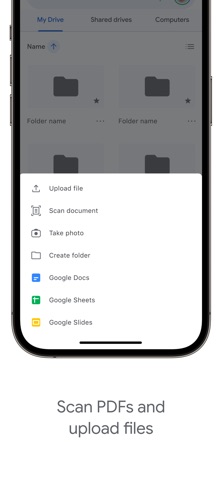
• Scan and upload paper documents using your device’s camera
• Quickly access recent and important files
• Search for files by name and content
• Filter files by type, last modified date and more
• Share and set permissions for files and folders
• View your content on the go while offline
• Receive notifications about important activity on your files
Google Workspace subscribers have access to additional Drive functionality, including:
• Using AI to summarize information, retrieve quick facts, and surface insights from your files
• Security and management controls for admins to help meet data compliance needs
• Sharing files and folders directly with groups or teams within your organization
• Creating a shared drive to store all of your team’s content
• Requesting electronic signatures and manage vendor agreements, customer contracts, and more
Learn more about Google Apps update policy: https://support.google.com/a/answer/6288871
Google accounts get 15GB of storage, shared across Google Drive, Gmail, and Google Photos. For additional storage, you can upgrade to Google Workspace or Google One as an in-app purchase.
Storage subscriptions purchased from the app will be charged to your iTunes Account, and automatically renew unless auto-renew is turned off at least 24 hours before the end of the current period. Subscriptions and auto-renewal may be managed by going to iTunes Account Settings after purchase.
Google Privacy Policy: https://www.google.com/intl/en_US/policies/privacy
Google Drive Terms of Service: https://www.google.com/drive/terms-of-service
Follow us for more:
X: https://x.com/googleworkspace and https://x.com/googledrive
LinkedIn: https://www.linkedin.com/showcase/googleworkspace
Facebook: https://www.facebook.com/googleworkspace/
With Drive, you can:
• Safely store and access your files anywhere
• Edit and store 100+ file types, including PDFs, Office files, videos and more
• Scan and upload paper documents using your device’s camera
• Quickly access recent and important files
• Search for files by name and content
• Filter files by type, last modified date and more
• Share and set permissions for files and folders
• View your content on the go while offline
• Receive notifications about important activity on your files
Google Workspace subscribers have access to additional Drive functionality, including:
• Using AI to summarize information, retrieve quick facts, and surface insights from your files
• Security and management controls for admins to help meet data compliance needs
• Sharing files and folders directly with groups or teams within your organization
• Creating a shared drive to store all of your team’s content
• Requesting electronic signatures and manage vendor agreements, customer contracts, and more
Learn more about Google Apps update policy: https://support.google.com/a/answer/6288871
Google accounts get 15GB of storage, shared across Google Drive, Gmail, and Google Photos. For additional storage, you can upgrade to Google Workspace or Google One as an in-app purchase.
Storage subscriptions purchased from the app will be charged to your iTunes Account, and automatically renew unless auto-renew is turned off at least 24 hours before the end of the current period. Subscriptions and auto-renewal may be managed by going to iTunes Account Settings after purchase.
Google Privacy Policy: https://www.google.com/intl/en_US/policies/privacy
Google Drive Terms of Service: https://www.google.com/drive/terms-of-service
Follow us for more:
X: https://x.com/googleworkspace and https://x.com/googledrive
LinkedIn: https://www.linkedin.com/showcase/googleworkspace
Facebook: https://www.facebook.com/googleworkspace/
Screenshots



Recent reviews (US)
Rating
Show
★★★★★
16 Oct 2026
Good
It transfers all of my performance videos, and tracks that I need to do my show. I am very thankful for Google Drive. It did a very good job.😁
★☆☆☆☆
16 Oct 2026
Error en la integración con otras aplicaciones
Muchas errores de conexión con otras APPs, al intentar acceder a Drive desde otros APPs, siempre marca error de conexión y hasta que reinstalo se quitan, pero a las segunda o tercer vez de uso, vuelve a fallar.
★★★★★
16 Oct 2026
Buenisimo
De en hacerle una IA para trabajjar el documento
★★★★★
16 Oct 2026
احسن تطبيق
جميل وجميل درايف
★★★★★
15 Oct 2026
10 year plus user , always loved it always will
Thanks for everything so far
Chart presence — 78 Top 100 positions
| Storefront | Category | Chart | Rank |
|---|---|---|---|
| Indonesia | Apps | Top Free | #21 |
| Russia | Apps | Top Grossing | #26 |
| Indonesia | Apps | Top Grossing | #27 |
| Philippines | Apps | Top Free | #27 |
| Argentina | Apps | Top Grossing | #28 |
| Brazil | Apps | Top Grossing | #30 |
| Colombia | Apps | Top Free | #33 |
| Argentina | Apps | Top Free | #34 |
| Philippines | Apps | Top Grossing | #34 |
| Estonia | Apps | Top Free | #35 |
| Spain | Apps | Top Free | #36 |
| Mexico | Apps | Top Free | #36 |
| Italy | Apps | Top Free | #41 |
| Vietnam | Apps | Top Free | #41 |
| Croatia | Apps | Top Free | #45 |
| Canada | Apps | Top Free | #47 |
| Chile | Apps | Top Free | #47 |
| Chile | Apps | Top Grossing | #47 |
| Greece | Apps | Top Free | #49 |
| Ukraine | Apps | Top Grossing | #49 |
| Hungary | Apps | Top Free | #50 |
| Vietnam | Apps | Top Grossing | #50 |
| Malaysia | Apps | Top Free | #51 |
| Portugal | Apps | Top Free | #51 |
| France | Apps | Top Free | #53 |
| Hungary | Apps | Top Grossing | #54 |
| India | Apps | Top Grossing | #54 |
| Egypt | Apps | Top Free | #57 |
| Japan | Apps | Top Free | #57 |
| Colombia | Apps | Top Grossing | #58 |
| Estonia | Apps | Top Grossing | #60 |
| Malaysia | Apps | Top Grossing | #60 |
| Ireland | Apps | Top Free | #62 |
| Poland | Apps | Top Free | #62 |
| Belgium | Apps | Top Free | #63 |
| Pakistan | Apps | Top Free | #63 |
| Thailand | Apps | Top Grossing | #63 |
| Bahrain | Apps | Top Free | #65 |
| Israel | Apps | Top Free | #65 |
| Slovakia | Apps | Top Free | #65 |
| United States | Apps | Top Free | #66 |
| India | Apps | Top Free | #68 |
| Romania | Apps | Top Free | #70 |
| Kazakhstan | Apps | Top Free | #71 |
| Czech Republic | Apps | Top Free | #73 |
| Sweden | Apps | Top Free | #73 |
| Ukraine | Apps | Top Free | #73 |
| Spain | Apps | Top Grossing | #75 |
| Qatar | Apps | Top Free | #75 |
| Singapore | Apps | Top Free | #75 |
| Kazakhstan | Apps | Top Grossing | #76 |
| South Africa | Apps | Top Grossing | #77 |
| Thailand | Apps | Top Free | #78 |
| Slovakia | Apps | Top Grossing | #79 |
| Brazil | Apps | Top Free | #80 |
| Poland | Apps | Top Grossing | #81 |
| Iceland | Apps | Top Free | #82 |
| Lithuania | Apps | Top Free | #82 |
| Mexico | Apps | Top Grossing | #82 |
| Hong Kong | Apps | Top Grossing | #83 |
| Israel | Apps | Top Grossing | #84 |
| Oman | Apps | Top Free | #85 |
| Pakistan | Apps | Top Grossing | #85 |
| Portugal | Apps | Top Grossing | #85 |
| Saudi Arabia | Apps | Top Free | #85 |
| Australia | Apps | Top Free | #86 |
| United Arab Emirates | Apps | Top Free | #87 |
| Austria | Apps | Top Free | #87 |
| New Zealand | Apps | Top Free | #87 |
| South Africa | Apps | Top Free | #89 |
| Latvia | Apps | Top Free | #95 |
| United Kingdom | Apps | Top Free | #97 |
| Turkey | Apps | Top Free | #99 |
| Taiwan | Apps | Top Grossing | #99 |
| Bahrain | Apps | Top Grossing | #100 |
| Switzerland | Apps | Top Free | #100 |
| Egypt | Apps | Top Grossing | #100 |
| Singapore | Apps | Top Grossing | #100 |
Ratings by country — 53 storefronts
| Storefront | Rating | Rating Count | Price |
|---|---|---|---|
| United States | 4.8 ★ | 7.9M | Free |
| Brazil | 4.9 ★ | 2.2M | Free |
| India | 4.7 ★ | 1.8M | Free |
| Vietnam | 4.8 ★ | 1.3M | Free |
| Mexico | 4.9 ★ | 1.2M | Free |
| Thailand | 4.8 ★ | 1.2M | Free |
| Japan | 4.6 ★ | 1.2M | Free |
| Taiwan | 4.8 ★ | 991k | Free |
| Indonesia | 4.9 ★ | 904k | Free |
| Canada | 4.7 ★ | 839k | Free |
| Spain | 4.7 ★ | 830k | Free |
| United Kingdom | 4.7 ★ | 711k | Free |
| France | 4.7 ★ | 651k | Free |
| Italy | 4.7 ★ | 595k | Free |
| Saudi Arabia | 4.7 ★ | 515k | Free |
| Colombia | 4.9 ★ | 509k | Free |
| Philippines | 4.8 ★ | 500k | Free |
| Argentina | 4.8 ★ | 469k | Free |
| Australia | 4.7 ★ | 461k | Free |
| Russia | 4.8 ★ | 393k | Free |
| Malaysia | 4.8 ★ | 369k | Free |
| Chile | 4.8 ★ | 346k | Free |
| Turkey | 4.7 ★ | 339k | Free |
| Ukraine | 4.8 ★ | 315k | Free |
| Hong Kong | 4.7 ★ | 300k | Free |
| Egypt | 4.7 ★ | 181k | Free |
| United Arab Emirates | 4.7 ★ | 175k | Free |
| Israel | 4.6 ★ | 167k | Free |
| Poland | 4.8 ★ | 167k | Free |
| Singapore | 4.7 ★ | 165k | Free |
| South Africa | 4.7 ★ | 160k | Free |
| Portugal | 4.8 ★ | 142k | Free |
| Sweden | 4.6 ★ | 133k | Free |
| Hungary | 4.7 ★ | 129k | Free |
| Pakistan | 4.7 ★ | 115k | Free |
| Belgium | 4.6 ★ | 105k | Free |
| New Zealand | 4.7 ★ | 97k | Free |
| Switzerland | 4.6 ★ | 90k | Free |
| Romania | 4.8 ★ | 82k | Free |
| Czech Republic | 4.8 ★ | 67k | Free |
| Ireland | 4.7 ★ | 66k | Free |
| Kazakhstan | 4.9 ★ | 66k | Free |
| Greece | 4.8 ★ | 50k | Free |
| Austria | 4.7 ★ | 47k | Free |
| Oman | 4.6 ★ | 39k | Free |
| Qatar | 4.7 ★ | 39k | Free |
| Slovakia | 4.8 ★ | 33k | Free |
| Croatia | 4.8 ★ | 30k | Free |
| Lithuania | 4.8 ★ | 19k | Free |
| Estonia | 4.8 ★ | 19k | Free |
| Bahrain | 4.7 ★ | 19k | Free |
| Latvia | 4.8 ★ | 15k | Free |
| Iceland | 4.7 ★ | 7k | Free |
Details
App Store data shown here is sourced from Apple's public iTunes RSS chart feeds and the iTunes Lookup API, collected by Zing at regular intervals. Figures may differ from Apple's internal App Store Connect analytics. Reviews are sourced from Apple's public customer-reviews feed (US storefront, most recent first).
Explore App Store Intelligence