
Rating
—
No ratings yet
Price
Free
US storefront
Size
2.9 GB
v27.0
Age Rating
4+
1 languages
Categories
Developer Tools
Daily chart position by storefront
Top Free (Apps)
Tracking since 27 Apr 2026 · lower is better · hover a point for the exact date and rank
Description
Xcode offers the tools you need to develop, test, and distribute apps for Apple platforms, including generative intelligence powered by frontier coding agents and models, advanced profiling and debugging tools, and simulators for Apple devices. It enables a unified workflow that spans from the earliest stages of app development to testing, debugging, optimization, and app distribution to testers and users. And with the Swift programming language, Xcode makes developing apps easy and fun.
Device Hub enables rapid prototyping and testing of your app on both physical devices and simulators, with dynamic resizing and adjustable appearance. Instruments helps you profile and analyze your app, improve performance, and investigate system resource usage. And you can design stunning layered icons out of Liquid Glass with Icon Composer, train custom machine learning models with Create ML, and identify potential accessibility issues with Accessibility Inspector.
To test or run applications on an Apple device, all you need is a free Apple Account. To submit your apps to the App Store, you must be a member of the Apple Developer Program. Some features may require internet access and may not be available in all regions or on all Apple devices.
Device Hub enables rapid prototyping and testing of your app on both physical devices and simulators, with dynamic resizing and adjustable appearance. Instruments helps you profile and analyze your app, improve performance, and investigate system resource usage. And you can design stunning layered icons out of Liquid Glass with Icon Composer, train custom machine learning models with Create ML, and identify potential accessibility issues with Accessibility Inspector.
To test or run applications on an Apple device, all you need is a free Apple Account. To submit your apps to the App Store, you must be a member of the Apple Developer Program. Some features may require internet access and may not be available in all regions or on all Apple devices.
Screenshots

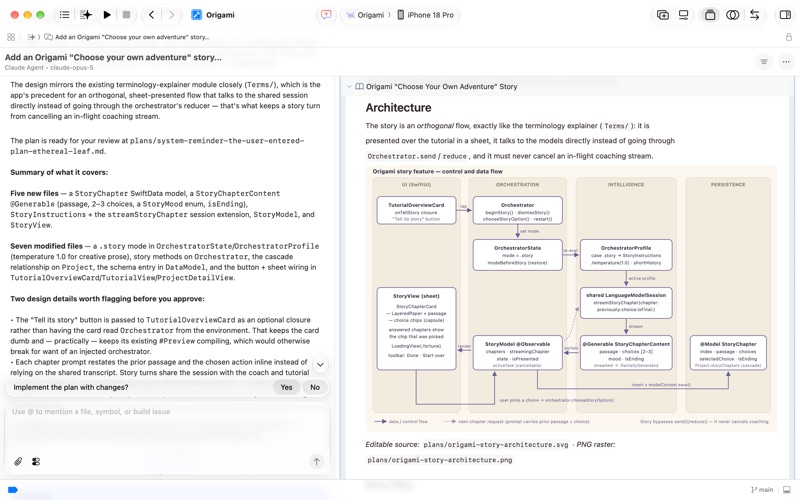

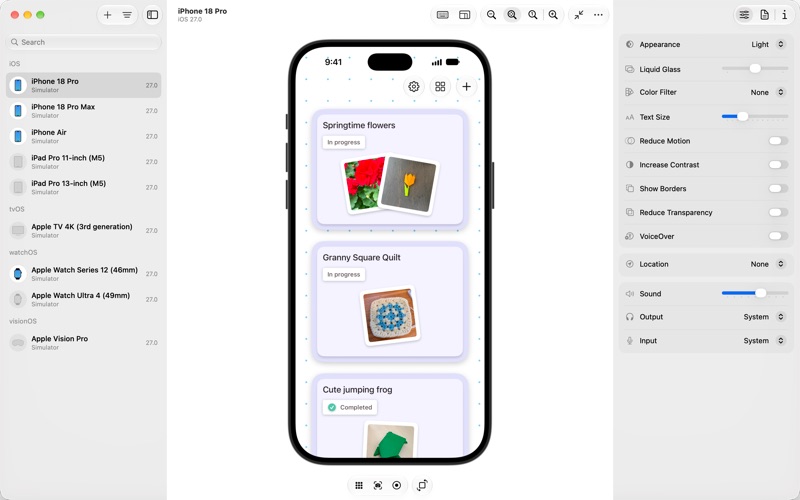
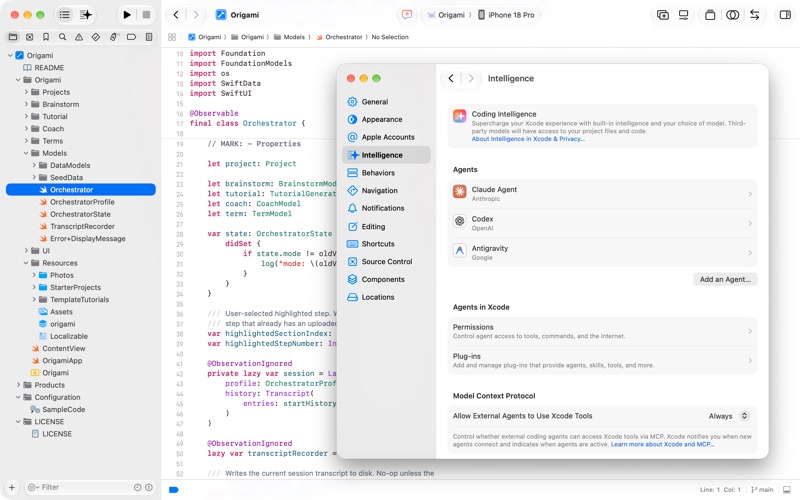
Chart presence — 62 positions tracked
| Storefront | Category | Chart | Rank |
|---|---|---|---|
| Bahrain | Apps | Top Free | #7 |
| Israel | Apps | Top Free | #10 |
| South Korea | Apps | Top Free | #12 |
| Turkey | Apps | Top Free | #12 |
| Finland | Apps | Top Free | #13 |
| India | Apps | Top Free | #14 |
| Japan | Apps | Top Free | #14 |
| Romania | Apps | Top Free | #14 |
| Brazil | Apps | Top Free | #15 |
| Iceland | Apps | Top Free | #15 |
| New Zealand | Apps | Top Free | #15 |
| Poland | Apps | Top Free | #15 |
| Germany | Apps | Top Free | #16 |
| Italy | Apps | Top Free | #16 |
| Pakistan | Apps | Top Free | #16 |
| Australia | Apps | Top Free | #17 |
| Estonia | Apps | Top Free | #17 |
| Sweden | Apps | Top Free | #17 |
| Taiwan | Apps | Top Free | #17 |
| United States | Apps | Top Free | #17 |
| South Africa | Apps | Top Free | #17 |
| Austria | Apps | Top Free | #18 |
| Canada | Apps | Top Free | #18 |
| Kazakhstan | Apps | Top Free | #18 |
| Singapore | Apps | Top Free | #18 |
| Ukraine | Apps | Top Free | #18 |
| Czech Republic | Apps | Top Free | #19 |
| Netherlands | Apps | Top Free | #19 |
| Norway | Apps | Top Free | #19 |
| Switzerland | Apps | Top Free | #20 |
| Argentina | Apps | Top Free | #21 |
| Hungary | Apps | Top Free | #21 |
| Portugal | Apps | Top Free | #21 |
| Saudi Arabia | Apps | Top Free | #21 |
| Nigeria | Apps | Top Free | #22 |
| Egypt | Apps | Top Free | #23 |
| Vietnam | Apps | Top Free | #23 |
| United Kingdom | Apps | Top Free | #24 |
| Belgium | Apps | Top Free | #26 |
| Hong Kong | Apps | Top Free | #26 |
| Kuwait | Apps | Top Free | #26 |
| Latvia | Apps | Top Free | #26 |
| Denmark | Apps | Top Free | #27 |
| Greece | Apps | Top Free | #27 |
| Colombia | Apps | Top Free | #28 |
| Spain | Apps | Top Free | #28 |
| Oman | Apps | Top Free | #28 |
| Slovakia | Apps | Top Free | #28 |
| Thailand | Apps | Top Free | #28 |
| United Arab Emirates | Apps | Top Free | #29 |
| France | Apps | Top Free | #29 |
| Chile | Apps | Top Free | #31 |
| Lithuania | Apps | Top Free | #31 |
| Mexico | Apps | Top Free | #31 |
| Russia | Apps | Top Free | #31 |
| Malaysia | Apps | Top Free | #34 |
| Indonesia | Apps | Top Free | #35 |
| Croatia | Apps | Top Free | #37 |
| Ireland | Apps | Top Free | #37 |
| Qatar | Apps | Top Free | #39 |
| Philippines | Apps | Top Free | #41 |
| China | Apps | Top Free | #50 |
Ratings by country — 62 storefronts
| Storefront | Rating | Rating Count | Price |
|---|---|---|---|
| Bahrain | 0.0 ★ | 0 | Free |
| Israel | 0.0 ★ | 0 | Free |
| South Korea | 0.0 ★ | 0 | Free |
| Turkey | 0.0 ★ | 0 | Free |
| Finland | 0.0 ★ | 0 | Free |
| India | 0.0 ★ | 0 | Free |
| Japan | 0.0 ★ | 0 | Free |
| Romania | 0.0 ★ | 0 | Free |
| Brazil | 0.0 ★ | 0 | Free |
| Iceland | 0.0 ★ | 0 | Free |
| New Zealand | 0.0 ★ | 0 | Free |
| Poland | 0.0 ★ | 0 | Free |
| Germany | 0.0 ★ | 0 | Free |
| Italy | 0.0 ★ | 0 | Free |
| Pakistan | 0.0 ★ | 0 | Free |
| Australia | 0.0 ★ | 0 | Free |
| Estonia | 0.0 ★ | 0 | Free |
| Sweden | 0.0 ★ | 0 | Free |
| Taiwan | 0.0 ★ | 0 | Free |
| United States | 0.0 ★ | 0 | Free |
| South Africa | 0.0 ★ | 0 | Free |
| Austria | 0.0 ★ | 0 | Free |
| Canada | 0.0 ★ | 0 | Free |
| Kazakhstan | 0.0 ★ | 0 | Free |
| Singapore | 0.0 ★ | 0 | Free |
| Ukraine | 0.0 ★ | 0 | Free |
| Czech Republic | 0.0 ★ | 0 | Free |
| Netherlands | 0.0 ★ | 0 | Free |
| Norway | 0.0 ★ | 0 | Free |
| Switzerland | 0.0 ★ | 0 | Free |
| Argentina | 0.0 ★ | 0 | Free |
| Hungary | 0.0 ★ | 0 | Free |
| Portugal | 0.0 ★ | 0 | Free |
| Saudi Arabia | 0.0 ★ | 0 | Free |
| Nigeria | 0.0 ★ | 0 | Free |
| Egypt | 0.0 ★ | 0 | Free |
| Vietnam | 0.0 ★ | 0 | Free |
| United Kingdom | 0.0 ★ | 0 | Free |
| Belgium | 0.0 ★ | 0 | Free |
| Hong Kong | 0.0 ★ | 0 | Free |
| Kuwait | 0.0 ★ | 0 | Free |
| Latvia | 0.0 ★ | 0 | Free |
| Denmark | 0.0 ★ | 0 | Free |
| Greece | 0.0 ★ | 0 | Free |
| Colombia | 0.0 ★ | 0 | Free |
| Spain | 0.0 ★ | 0 | Free |
| Oman | 0.0 ★ | 0 | Free |
| Slovakia | 0.0 ★ | 0 | Free |
| Thailand | 0.0 ★ | 0 | Free |
| United Arab Emirates | 0.0 ★ | 0 | Free |
| France | 0.0 ★ | 0 | Free |
| Chile | 0.0 ★ | 0 | Free |
| Lithuania | 0.0 ★ | 0 | Free |
| Mexico | 0.0 ★ | 0 | Free |
| Russia | 0.0 ★ | 0 | Free |
| Malaysia | 0.0 ★ | 0 | Free |
| Indonesia | 0.0 ★ | 0 | Free |
| Croatia | 0.0 ★ | 0 | Free |
| Ireland | 0.0 ★ | 0 | Free |
| Qatar | 0.0 ★ | 0 | Free |
| Philippines | 0.0 ★ | 0 | Free |
| China | 0.0 ★ | 0 | Free |
Details
App Store data shown here is sourced from Apple's public iTunes RSS chart feeds and the iTunes Lookup API, collected by Zing at regular intervals. Figures may differ from Apple's internal App Store Connect analytics.
Explore App Store Intelligence