
📱 App Store Intelligence
2Do: To-Do Liste & Aufgaben
Beehive Innovations Services · Produktivität
Rating
4.6 ★
7 ratings
Price
CHF 9.00
US storefront
Size
161.7 MB
v4.2.0
Age Rating
4+
18 languages
Categories
Produktivität
Wirtschaft
Daily chart position by storefront
Top Paid (Apps)
Tracking since 10 Sep 2026 · lower is better · hover a point for the exact date and rank
Description
"2Do adapts to my needs, not the other way around. 2Do gets me." — MacStories
2Do is a to do list, task manager and daily planner in one, with a simple, fluid interface wrapped around a deep and flexible set of features. Keep a quick checklist, run a full GTD® system, or anything in between: there is no wrong way to use 2Do, and it never forces a methodology on you.
One-time purchase. No subscription, no account to create, no strings attached.
TYPE IT THE WAY YOU'D SAY IT
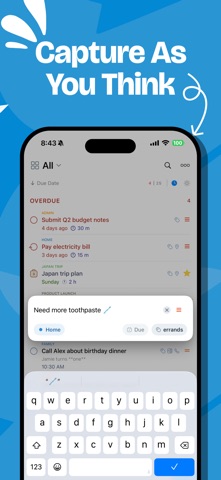
• New: natural language input. Type "Call the dentist tomorrow at 3pm #health" and 2Do fills in the due date, time and tag as you type
• It reads dates, times, repeats, alerts, durations, priorities, tags, lists and saved locations, in English, German, Spanish, French, Italian, Dutch, Japanese, Korean, Chinese and Russian
CAPTURE ANYTHING, FAST
• Quick Add: touch and hold [+] and file task after task, with dates, tags and lists as you type
• Siri & Shortcuts: add tasks by voice, or wire 2Do into routines that do the whole job
• Widgets, Lock Screen and Control Center, so capture never waits for the app
• Mail to 2Do: your device gets a private email address, and anything you send it lands as a task, checklist and all
• A GTD® Inbox for everything not yet sorted
SIMPLE TASKS, OR AS MUCH MORE AS YOU NEED
• Start with a task, grow it into a checklist or a project with sub-tasks
• Notes in Markdown, styled as you type, with links collected for you
• Flexible repeats, start dates that hide tasks until they matter, durations, and actions that make the next call or message one tap away
• Attach images and voice notes
SMART LISTS: SAVED SEARCHES WITH SUPERPOWERS
• Search across titles, notes, tags and dates; sounds-like matching finds it even when you can't spell it
• Save any search as a one-tap view: your weekly review, stalled projects, errands nearby
• Focus filter: set a rule per list and one tap hides everything that can wait
TAGS THAT SORT EVERYTHING
• One tap on a tag filters your day to that context; Tag Groups keep big collections tidy
• Pause a tag and every task carrying it steps out of view, hidden, not deleted, until you're ready
NEVER MISS A THING
• Stack multiple alerts on a task and let 2Do nag until it's done
• On iOS 26.1 and later, an alert can ring like a Clock alarm: full screen, through Silent mode, until you answer
• Nearby: location reminders that fire when you're close enough to actually do the task
• See your calendar events right above your tasks, so plans never collide
SYNC YOUR WAY
Most apps decide where your data lives. 2Do thinks that's your call:
• iCloud: uses the account already on your device; syncs tasks, Smart Lists, tags, groups and attachments
• Apple Reminders: your tasks live in Reminders too, so Siri and everything that reads Reminders can see them
• Todoist: connect your account and run your Todoist projects right inside 2Do
• Dropbox, Toodledo, Fastmail, or any CalDAV server you trust, including one you run yourself
• When two devices meet, 2Do can merge them instead of making you pick a winner
• 2Do for Mac is available separately, so your lists follow you to the desktop
MADE FOR ONE HAND
• Slide between your lists, tasks and a utility panel with Tags, Nearby and Calendar Events; one thumb runs all three
• Pinch to zoom between three levels of detail
• Quick Open: type a few letters, land on any task or list
• Batch edit and drag & drop: defer, tag or move a whole stack of tasks in one go
YOURS, PRIVATELY
• Lock individual lists or the whole app
• Automatic backups, with single-list restore for the day something goes wrong
• Share lists over Wi-Fi with other 2Do users nearby, no cloud in between
• Independent light and dark themes
• Apple Watch app with complications
2Do has been refined over years of careful work, with feedback from students, parents, professionals and lifelong list-keepers along the way. Use it as a simple list, or push it into full GTD® territory. Either way, it's ready.
2Do is a to do list, task manager and daily planner in one, with a simple, fluid interface wrapped around a deep and flexible set of features. Keep a quick checklist, run a full GTD® system, or anything in between: there is no wrong way to use 2Do, and it never forces a methodology on you.
One-time purchase. No subscription, no account to create, no strings attached.
TYPE IT THE WAY YOU'D SAY IT
• New: natural language input. Type "Call the dentist tomorrow at 3pm #health" and 2Do fills in the due date, time and tag as you type
• It reads dates, times, repeats, alerts, durations, priorities, tags, lists and saved locations, in English, German, Spanish, French, Italian, Dutch, Japanese, Korean, Chinese and Russian
CAPTURE ANYTHING, FAST
• Quick Add: touch and hold [+] and file task after task, with dates, tags and lists as you type
• Siri & Shortcuts: add tasks by voice, or wire 2Do into routines that do the whole job
• Widgets, Lock Screen and Control Center, so capture never waits for the app
• Mail to 2Do: your device gets a private email address, and anything you send it lands as a task, checklist and all
• A GTD® Inbox for everything not yet sorted
SIMPLE TASKS, OR AS MUCH MORE AS YOU NEED
• Start with a task, grow it into a checklist or a project with sub-tasks
• Notes in Markdown, styled as you type, with links collected for you
• Flexible repeats, start dates that hide tasks until they matter, durations, and actions that make the next call or message one tap away
• Attach images and voice notes
SMART LISTS: SAVED SEARCHES WITH SUPERPOWERS
• Search across titles, notes, tags and dates; sounds-like matching finds it even when you can't spell it
• Save any search as a one-tap view: your weekly review, stalled projects, errands nearby
• Focus filter: set a rule per list and one tap hides everything that can wait
TAGS THAT SORT EVERYTHING
• One tap on a tag filters your day to that context; Tag Groups keep big collections tidy
• Pause a tag and every task carrying it steps out of view, hidden, not deleted, until you're ready
NEVER MISS A THING
• Stack multiple alerts on a task and let 2Do nag until it's done
• On iOS 26.1 and later, an alert can ring like a Clock alarm: full screen, through Silent mode, until you answer
• Nearby: location reminders that fire when you're close enough to actually do the task
• See your calendar events right above your tasks, so plans never collide
SYNC YOUR WAY
Most apps decide where your data lives. 2Do thinks that's your call:
• iCloud: uses the account already on your device; syncs tasks, Smart Lists, tags, groups and attachments
• Apple Reminders: your tasks live in Reminders too, so Siri and everything that reads Reminders can see them
• Todoist: connect your account and run your Todoist projects right inside 2Do
• Dropbox, Toodledo, Fastmail, or any CalDAV server you trust, including one you run yourself
• When two devices meet, 2Do can merge them instead of making you pick a winner
• 2Do for Mac is available separately, so your lists follow you to the desktop
MADE FOR ONE HAND
• Slide between your lists, tasks and a utility panel with Tags, Nearby and Calendar Events; one thumb runs all three
• Pinch to zoom between three levels of detail
• Quick Open: type a few letters, land on any task or list
• Batch edit and drag & drop: defer, tag or move a whole stack of tasks in one go
YOURS, PRIVATELY
• Lock individual lists or the whole app
• Automatic backups, with single-list restore for the day something goes wrong
• Share lists over Wi-Fi with other 2Do users nearby, no cloud in between
• Independent light and dark themes
• Apple Watch app with complications
2Do has been refined over years of careful work, with feedback from students, parents, professionals and lifelong list-keepers along the way. Use it as a simple list, or push it into full GTD® territory. Either way, it's ready.
Screenshots



Recent reviews (US)
No reviews collected for this app yet — review sampling is currently limited to apps ranked in the US Top 100 (Top Free, Top Paid or Top Grossing) to stay within Apple's request limits.
Chart presence — 4 Top 100 positions
| Storefront | Category | Chart | Rank |
|---|---|---|---|
| Oman | Apps | Top Paid | #46 |
| Switzerland | Apps | Top Paid | #67 |
| Estonia | Apps | Top Paid | #75 |
| Hungary | Apps | Top Paid | #95 |
Ratings by country — 4 storefronts
| Storefront | Rating | Rating Count | Price |
|---|---|---|---|
| Switzerland | 4.6 ★ | 7 | Free |
| Estonia | 0.0 ★ | 0 | 9,99 € |
| Hungary | 0.0 ★ | 0 | Free |
| Oman | 0.0 ★ | 0 | Free |
Details
App Store data shown here is sourced from Apple's public iTunes RSS chart feeds and the iTunes Lookup API, collected by Zing at regular intervals. Figures may differ from Apple's internal App Store Connect analytics.
Explore App Store Intelligence