
📱 App Store Intelligence
Koala Sampler • Beat Maker
Mazbox Limited · Music
Rating
4.8 ★
1k ratings
Price
$4.99
US storefront
Size
59.0 MB
v2.0.3
Age Rating
4+
1 languages
Categories
Music
Entertainment
Daily chart position by storefront
Top Paid (Apps)
Tracking since 6 Apr 2026 · lower is better · hover a point for the exact date and rank
Description
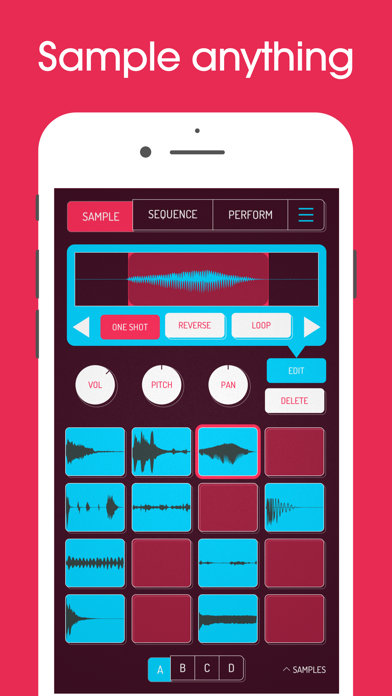
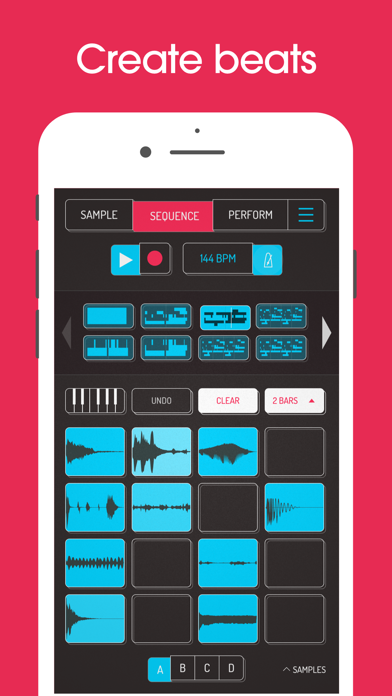
Koala is the ultimate pocket-sized sampler. Record anything with your phone's mic or load your own sounds. Use Koala to create beats with those samples, add effects and create a track!
Koala's super intuitive interface helps you make a track in a flash - there is no brake pedal. You can also resample the output of the app back into the input, through the effects, so the sonic possibilities are endless.
Koala's design focuses totally on making the music-making process instant, keeping you in the flow and keeping it fun, not getting bogged down by pages of parameters and micro-editing.
"Been putting that $4 koala sampler to good use lately. Undeniably great tool that puts some of these expensive beat boxes to shame. A must cop."
-- flying lotus, twitter
* Record up to 64 different samples with your mic
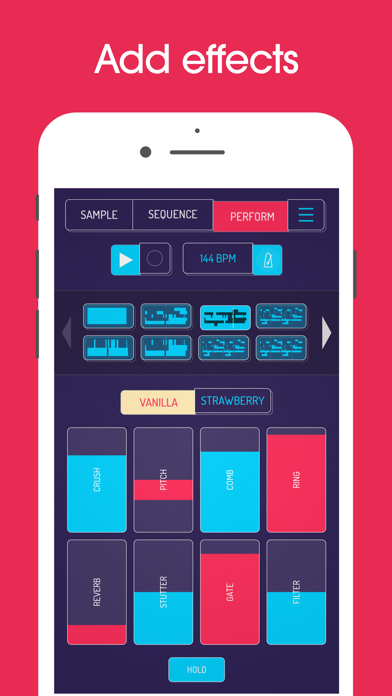
* Transform your voice or any other sound with 16 superb built-in fx
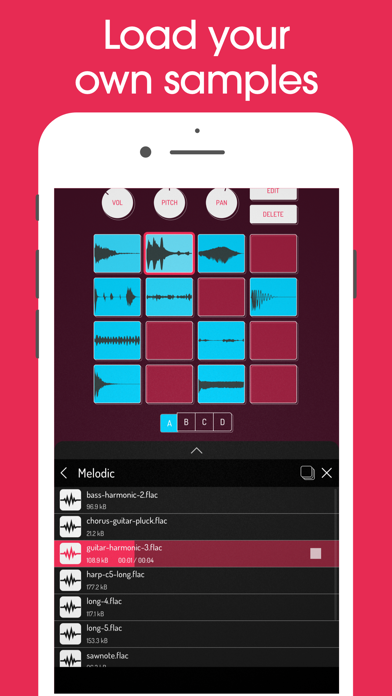
* Load your own samples
* Choose from one of 250 built-in sounds
* Resample the output of the app back into a new sample
* Export loops or entire tracks as professional quality WAV files
* Direct export to Ableton Live Set
* Copy/paste or merge sequences just by dragging them
* Create beats with the high-resolution sequencer
* Import samples from the Files app or even from videos
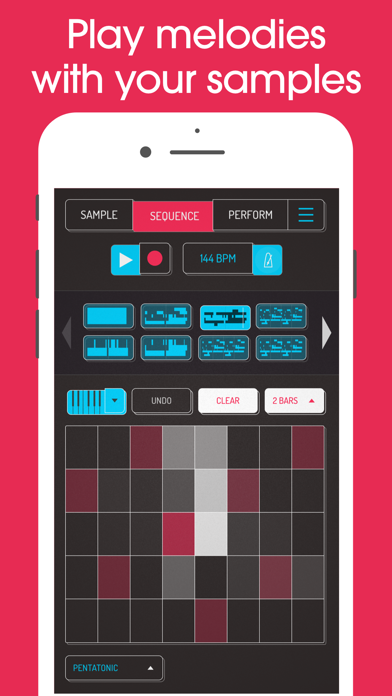
* Keyboard mode lets you play chromatically or one of 9 scales
* Quantize, add swing to get the right feel
* Normal/One-shot/Loop/Reverse playback of samples
* 6 Choke groups
* Attack, release and tone adjustable on each sample
* Mute/Solo controls and note repeat
* Add any (or all) of the 16 effects to the entire mix
* AUv3 compatible - use in GarageBand, Logic, Cubasis etc etc
* MIDI controllable - play your samples on a keyboard, map the effects to knobs
* Jam with others over WiFi with Ableton Link
* Free copy of Ableton Live Lite included
* AudioShare compatible
* Use AI to separate samples into individual instruments (drums, bass, vocals and other)
* Set your own background image and choose from a growing list of background visual FX
8 Built-in Microphone FX:
* More Bass
* More Treble
* Fuzz
* Robot
* Reverb
* Octave up
* Octave down
* Synthesizer
16 Built-in DJ Mix FX:
* Bit-crusher
* Pitch-shift
* Comb filter
* Ring modulator
* Reverb
* Stutter
* Gate
* Resonant High/Low Pass Filters
* Cutter
* Reverse
* Dub
* Tempo Delay
* Talkbox
* VibroFlange
* Dirty
* Compressor
Features included in SAMURAI In-App Purchase
* Pro-quality Timestretch (5 modes: Modern, Retro, Beats, Re-pitch and Cyclic)
* Piano roll editor
* Auto-chop (auto, equal, and lazy chop)
* 3 Band EQ
* Pocket operator sync out
* Quokka Synth - powerhouse polyphonic synthesizer
* MIDI Out - control external MIDI hardware with Koala's sequencer
* Chopper - multimodal sample chopping instrument
Features included in MIXER In-App Purchase
* Mix your beats professionally with a 4 channel mixer + main bus
* Route any sample to any channel
* Mute/solo, faders and accurate metering on every channel
* 5 effect slots per channel
* 29 high-quality effects - compressors, filters, phasers and more, with new effects to come
* Host AUv3 plugins - both audio effects and instruments
Koala's super intuitive interface helps you make a track in a flash - there is no brake pedal. You can also resample the output of the app back into the input, through the effects, so the sonic possibilities are endless.
Koala's design focuses totally on making the music-making process instant, keeping you in the flow and keeping it fun, not getting bogged down by pages of parameters and micro-editing.
"Been putting that $4 koala sampler to good use lately. Undeniably great tool that puts some of these expensive beat boxes to shame. A must cop."
-- flying lotus, twitter
* Record up to 64 different samples with your mic
* Transform your voice or any other sound with 16 superb built-in fx
* Load your own samples
* Choose from one of 250 built-in sounds
* Resample the output of the app back into a new sample
* Export loops or entire tracks as professional quality WAV files
* Direct export to Ableton Live Set
* Copy/paste or merge sequences just by dragging them
* Create beats with the high-resolution sequencer
* Import samples from the Files app or even from videos
* Keyboard mode lets you play chromatically or one of 9 scales
* Quantize, add swing to get the right feel
* Normal/One-shot/Loop/Reverse playback of samples
* 6 Choke groups
* Attack, release and tone adjustable on each sample
* Mute/Solo controls and note repeat
* Add any (or all) of the 16 effects to the entire mix
* AUv3 compatible - use in GarageBand, Logic, Cubasis etc etc
* MIDI controllable - play your samples on a keyboard, map the effects to knobs
* Jam with others over WiFi with Ableton Link
* Free copy of Ableton Live Lite included
* AudioShare compatible
* Use AI to separate samples into individual instruments (drums, bass, vocals and other)
* Set your own background image and choose from a growing list of background visual FX
8 Built-in Microphone FX:
* More Bass
* More Treble
* Fuzz
* Robot
* Reverb
* Octave up
* Octave down
* Synthesizer
16 Built-in DJ Mix FX:
* Bit-crusher
* Pitch-shift
* Comb filter
* Ring modulator
* Reverb
* Stutter
* Gate
* Resonant High/Low Pass Filters
* Cutter
* Reverse
* Dub
* Tempo Delay
* Talkbox
* VibroFlange
* Dirty
* Compressor
Features included in SAMURAI In-App Purchase
* Pro-quality Timestretch (5 modes: Modern, Retro, Beats, Re-pitch and Cyclic)
* Piano roll editor
* Auto-chop (auto, equal, and lazy chop)
* 3 Band EQ
* Pocket operator sync out
* Quokka Synth - powerhouse polyphonic synthesizer
* MIDI Out - control external MIDI hardware with Koala's sequencer
* Chopper - multimodal sample chopping instrument
Features included in MIXER In-App Purchase
* Mix your beats professionally with a 4 channel mixer + main bus
* Route any sample to any channel
* Mute/solo, faders and accurate metering on every channel
* 5 effect slots per channel
* 29 high-quality effects - compressors, filters, phasers and more, with new effects to come
* Host AUv3 plugins - both audio effects and instruments
Screenshots
Recent reviews (US)
Rating
Show
★★★★★
28 Aug 2026
Best Designed App of All Time
I design apps for a living. You can trust me.
★★★★★
25 Aug 2026
Best Devs in the game!
I just want to say thank you to the entire elf audio team. Over the past year or so you guys have been cooking! I really appreciate the quality product and support. You guys really listen to feedback and add what we ask for. I’ve asked for features few months later they are released. Thank you!
★★★★★
23 Aug 2026
The Don for beatmaking on IOS !
This sampler, hands down is the best app for beat making on an iPad. Thank you !!! Everything can always be improved. It would be cool if we could map the sample bank buttons to our midi controllers, and change each sequence to a different bpm 😉
★★★★★
22 Aug 2026
Best for Producers and Beginners
Record anything anywhere and get an idea down quick. Import to your DAW if you want. Do some sound design. Download some extra synths and effects, load them in, resample them, chop em up. Truly endless for sound design and beat making in a way that is excellent on mobile. Highly recommend
★★★★★
21 Aug 2026
Koala keeps getting better
A 50 $ used iPad can triple the feature set of your sp404mk2
Chart presence — 17 positions tracked
| Storefront | Category | Chart | Rank |
|---|---|---|---|
| Singapore | Apps | Top Paid | #20 |
| Lithuania | Apps | Top Paid | #25 |
| Mexico | Apps | Top Paid | #36 |
| Czech Republic | Apps | Top Paid | #46 |
| Norway | Apps | Top Paid | #52 |
| Hungary | Apps | Top Paid | #53 |
| Australia | Apps | Top Paid | #56 |
| Estonia | Apps | Top Paid | #58 |
| Sweden | Apps | Top Paid | #60 |
| France | Apps | Top Paid | #61 |
| Greece | Apps | Top Paid | #74 |
| Germany | Apps | Top Paid | #79 |
| Japan | Apps | Top Paid | #80 |
| United States | Apps | Top Paid | #89 |
| South Korea | Apps | Top Paid | #91 |
| Ukraine | Apps | Top Paid | #96 |
| Chile | Apps | Top Paid | #97 |
Ratings by country — 17 storefronts
| Storefront | Rating | Rating Count | Price |
|---|---|---|---|
| United States | 4.8 ★ | 1k | Free |
| Germany | 4.9 ★ | 280 | 5,99 € |
| Japan | 4.5 ★ | 232 | Free |
| France | 4.7 ★ | 118 | 5,99 € |
| Australia | 4.9 ★ | 94 | Free |
| Sweden | 5.0 ★ | 63 | 69,00 kr |
| Mexico | 4.6 ★ | 37 | Free |
| Ukraine | 4.7 ★ | 32 | 5,99 USD |
| Czech Republic | 4.9 ★ | 20 | 129,00 Kč |
| Norway | 4.6 ★ | 20 | 59,00 kr |
| Greece | 4.9 ★ | 15 | 5,99 € |
| Chile | 4.9 ★ | 13 | Free |
| South Korea | 4.8 ★ | 12 | Free |
| Hungary | 4.7 ★ | 11 | Free |
| Singapore | 5.0 ★ | 5 | Free |
| Estonia | 4.7 ★ | 3 | 5,99 € |
| Lithuania | 5.0 ★ | 2 | 5,99 € |
Details
App Store data shown here is sourced from Apple's public iTunes RSS chart feeds and the iTunes Lookup API, collected by Zing at regular intervals. Figures may differ from Apple's internal App Store Connect analytics. Reviews are sourced from Apple's public customer-reviews feed (US storefront, most recent first).
Explore App Store Intelligence