
Tasks for Pebble
App Store ID 6748659686 · False Peak
Not currently in Zing's Top 100
About
Tasks keeps your lists on your Pebble, your Apple Watch, your iPhone and your Mac, the same everywhere.
SAY IT, AND IT'S A LIST
On the watch, choose + New list and say something like "packing list for a weekend in Lisbon". Tasks writes the list with its items. Add more to any list by voice, from the watch or the iPhone.
CHECK IT OFF ON YOUR WRIST
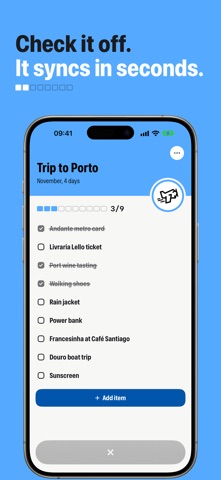
Open a list on the watch and press SELECT to check an item. Changes go both ways in a few seconds.
MADE FOR PEBBLE
Big, clear lists with the watch's own icons, colours and animations. A square progress row shows how far along you are. Works on Pebble Time 2, Pebble 2 Duo and Pebble Round 2.
A CALM LIST APP ON THE IPHONE
Icons and colours for every list, sections inside a list, notes on any item (a link, a size, a phone number), due dates with reminders, search that shows the items it found, light and dark themes and alternate app icons. Due items also appear on your Pebble's timeline.
IPHONE DUO, IPAD AND EVERY WINDOW
Open iPhone Duo and your lists sit beside the open list, like Mail. Closed, the controls move to the side strip. On iPad the same layout, in as many windows as you like.
A BOARD FOR ANY LIST
Show a list as To do, Doing and Done, and drag items across. It syncs with the Mac's board.
WIDGETS, CONTROLS AND SIRI
Tick items off from the Home Screen and the Lock Screen, start a list from Control Center or the Action button, and ask Siri "what's left on Groceries". Lists and items show up in Spotlight.
PASTE A LIST
Paste or drop a list from Notes, Mail or Safari: every line becomes an item, checked boxes and all.
SHARE A LIST
Invite people with a link or an 8-character code they can type in Tasks. Everyone sees the same items and who checked each one off. Sharing is free.
ONE ACCOUNT, EVERY DEVICE
Sign in with Apple or Google and your lists follow you to Tasks for Mac, your Apple Watch and your Pebble.
LINK ONCE
Open Tasks on your Pebble, press SELECT for a code and type it in Settings › Pebble watch. That's it.
TASKS PRO
Lists on the iPhone are free. Tasks Pro unlocks the Pebble and Apple Watch apps and the voice and AI features: a weekly, monthly or yearly subscription (the weekly plan starts with a 3-day free trial; new subscribers get their first year at half price). Payment is charged to your Apple Account at confirmation. The subscription renews unless you cancel at least 24 hours before the end of the period; manage or cancel it in your App Store account settings.
Terms: https://tasksforpebble.com/terms
Privacy: https://tasksforpebble.com/privacy
Pebble is a trademark of its owner. Tasks for Pebble is an independent app, not affiliated with, endorsed or sponsored by Core Devices or Rebble.
Screenshots




This app isn't currently charting in Zing's tracked Top 100 — showing a live snapshot from the App Store instead. Browse current charts →