
Translate — AI Translator
App Store ID 6743634763 · Accessible Resources Ltd
Not currently in Zing's Top 100
About
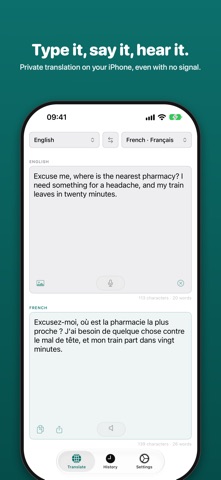
Translate is a fast, private translator for iPhone and iPad. It uses Apple's on-device translation engine, so the words you translate stay on your device, and once a language is downloaded it keeps working with no signal at all.
Type or paste, speak, or hand over a photo or a screenshot. Every way in ends in the same clear translation, ready to read aloud, copy or share.
TYPE OR PASTE
One pane for your words, one for the translation, which appears as you type. Set the source language to Auto-detect and Translate works it out for you.
SPEAK
Tap the microphone and talk. Your words appear as you say them, punctuation included, and the translation keeps up. Speech recognition stays on your device wherever the language supports it.
HEAR IT
Tap the speaker to hear the translation in the best voice installed for the language, or turn on Auto-read and each translation is spoken as it arrives.
PHOTOS AND SCREENSHOTS
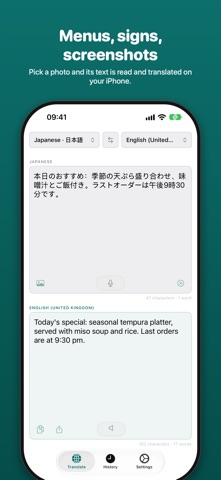
Pick a photo, or paste or drop in a screenshot. The text in it is read on your device and translated like anything you type: menus, signs, letters, messages.
HISTORY
Every translation is saved on your device. Search it, copy a line, swipe to delete, or tap one to pick up where you left off.
SIRI AND SHORTCUTS
Say "Translate with Translate", or add the Translate Text action to any shortcut and use the result anywhere, without opening the app.
LANGUAGES
• Every language Apple's on-device engine offers, shown by name and in its own script
• Star your favorites and arrange them in your own order
• Download languages in Settings to use them offline; downloaded ones are marked in the list
PRIVATE BY DESIGN
No account, no sign-up, no ads, no data collection. Your history stays on your device.
EASY TO READ
• Three text sizes
• Full VoiceOver support, with every control labeled
• Designed for both iPhone and iPad
Terms of Use (EULA): https://www.apple.com/legal/internet-services/itunes/dev/stdeula/
Privacy Policy: https://www.accessibleresources.com/privacy/translater
Screenshots


This app isn't currently charting in Zing's tracked Top 100 — showing a live snapshot from the App Store instead. Browse current charts →