
IPMask – Subnet Calculator
App Store ID 1031084465 · Aleksei Neronov
Not currently in Zing's Top 100
About
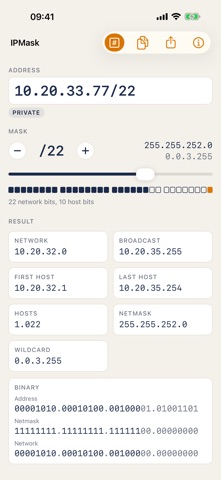
IPMask works out an IPv4 network from an address and a mask: network and broadcast address, first and last host, number of hosts, netmask and wildcard.
• Type the address the way you have it: 192.168.1.1, 192.168.1.1/22 or with a dotted mask.
• Move the mask slider and watch the 32 bits split into the network part and the host part.
• See the address type at a glance: private, public, loopback, link-local, multicast.
• Switch to the binary view to see the address, netmask and network bit by bit.
• Copy the whole result as text or share it.
• On Apple Watch: enter an address with a keypad, turn the Digital Crown to set the prefix and read the result on your wrist.
/31 point-to-point links (RFC 3021) and /32 host routes are handled correctly.
Made for network engineers, students and anyone who sets up a router at home. The app works offline; it needs a connection only for the small ad banner.
Screenshots


This app isn't currently charting in Zing's tracked Top 100 — showing a live snapshot from the App Store instead. Browse current charts →